L2Walker 1.78 In-Game Tutorial (Basic)
This guide explains the most important Walker pages you need to farm, buff, heal and support your party.
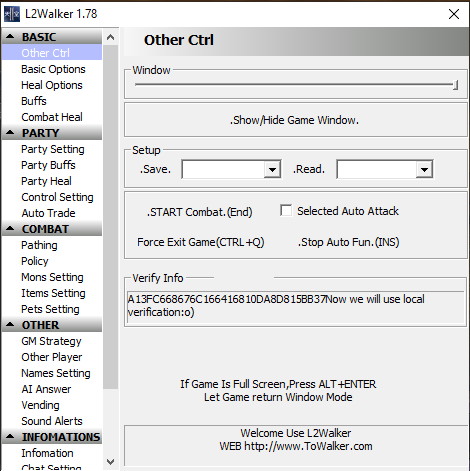
Other Ctrl (Main Control Panel)
- Show/Hide Game Window: Allows you to hide the game while botting in the background.
- Save / Read: Save your configuration profile and reload it later. Very useful if you play multiple characters.
- START Combat (End): Starts or stops the entire auto-hunting system.
- Selected Auto Attack: Walker will only attack the target you manually select (good for bosses or party assist).
- Stop Auto Fun (INS): Emergency key that instantly stops all automation.
- Force Exit Game (CTRL+Q): Emergency exit if something goes wrong.
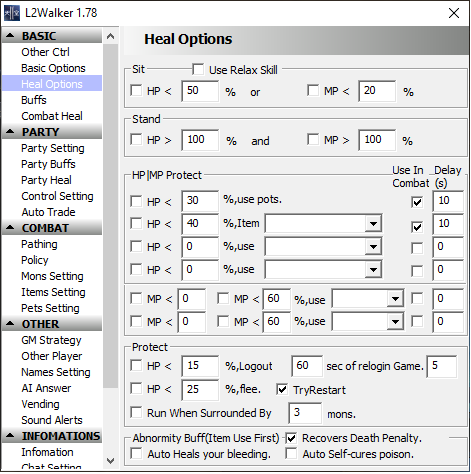
Heal Options (HP/MP Survival Settings)
- This page controls how your character survives automatically during farming.
- Sit HP%: Character will sit down to regenerate when HP drops below this percent.
- Stand HP%: Character will stand up again when HP is recovered.
- HP Protect: Use healing potions or healing skills when HP reaches certain danger levels.
- MP Protect: Automatically use mana potions or recharge items when MP becomes low.
- Logout Protection: If HP becomes critical, Walker can logout to prevent death.
- Recover Death Penalty: Auto recovery features after dying.
- Auto Cure: Automatically cure bleeding or poison if enabled.
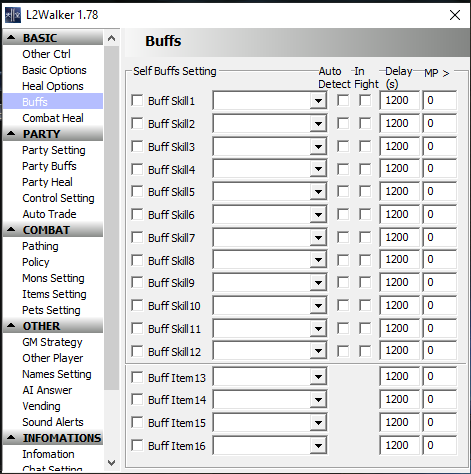
Buffs (Automatic Buff System)
- This page allows Walker to cast buffs automatically during farming.
- Buff Skill Slots: Add your buff skills (Might, Shield, Haste, etc).
- Auto Detect: Walker checks if the buff is missing and recasts it automatically.
- In Fight: Choose if buffs can be cast during combat or only outside combat.
- Delay: Time in seconds before rebuffing again.
- MP Limit: Prevent buffing if MP is too low.
- Perfect for support classes like Prophet, Warcryer, Bishop, EE.
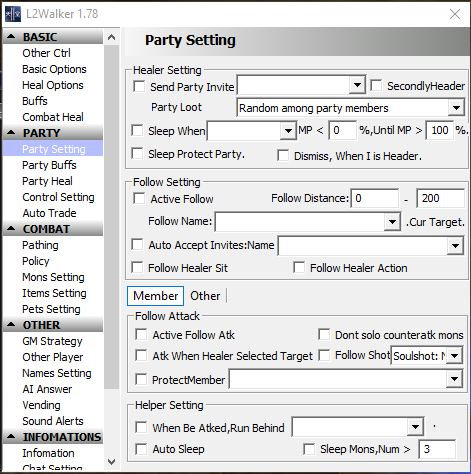
Party Setting (Follow & Assist System)
- This page is essential if you want Walker to work correctly inside a party.
- Active Follow: Your character will automatically follow the party leader.
- Follow Distance: Sets how close or far you stay behind the leader.
- Follow Name: Select which party member to follow.
- Protect Member: Assist party members if they are attacked.
- Auto Accept Invites: Automatically accept party invites from specific names.
- Helper Setting: Allows support actions like running away or sleeping monsters.
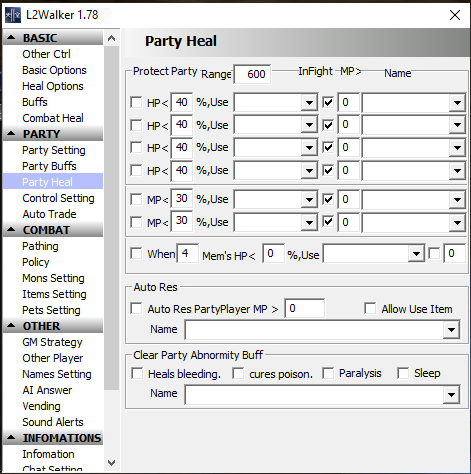
Party Heal (Healer Bot Configuration)
- This is the most important page for Bishops, Elven Elders and heal supports.
- Protect Party Range: Walker heals only party members within this distance.
- HP % Use Skill: Choose healing spells to cast when members fall below HP threshold.
- MP % Use: Use recharge skills when party MP becomes low.
- Auto Resurrection: Automatically resurrect dead party members.
- Clear Abnormal Buff: Cure poison, paralysis or sleep automatically.
- Name Filter: Heal only selected members if configured.
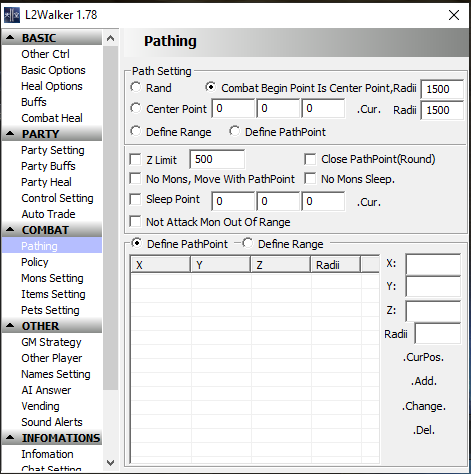
Pathing (Auto Farming Movement)
- This page controls how your character moves while hunting.
- Rand Mode: Random movement inside the farming area.
- Center Point: Farm around one fixed spot (best for small zones).
- Define PathPoint: Create a walking route with multiple coordinates.
- Z Limit: Prevent Walker from moving up/down too far.
- No Monsters Sleep: Sit down if no monsters are found.
- Not Attack Out of Range: Prevent chasing monsters too far away.
- Recommended for safe farming and stable bot behavior.
✅ You are now ready to use L2Walker 1.78 In-Game for farming, buffing and party support.
If you need help, contact our staff anytime.